


Maintenance failures often begin with a loose high-current terminal, an unverified reference, or an IEC 61850 file that no longer matches the relay configuration. By following a defined inspection, calibration, isolation, and troubleshooting process, you can separate tester faults from wiring, network, configuration, and protection-logic problems.
Key takeaways
- Inspect terminals, leads, earth, ports, fans, vents, and case before every shift.
- Compare analogue outputs and binary timing with traceable reference instruments.
- Back up IEC 61850 files and verify network settings, traffic, and time synchronisation.
- Log symptoms and tests before requesting MP3000F relay tester support or repair.
Build a safe inspection, shutdown, and storage routine
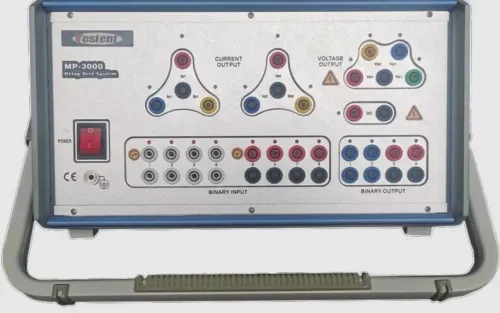
Inspect the MP3000F IEC 61850 relay test set before every shift. Check current and voltage output terminals, binary inputs and outputs, test leads, protective-earth connection, power inlet, Ethernet ports, optical transceivers if fitted, cooling fans, vents, carrying case, and signs of overheating, cracks, contamination, or loose connectors.
1. Before testing, verify the correct test file, output limits, earthing arrangement, and test-switch position. Isolate station batteries, CT circuits, VT circuits, and external binary or voltage sources. Disconnect or control Ethernet links as the switching plan requires, and confirm IEC 61850 ports and fibres are undamaged. Remove external sources before connecting leads.
2. During testing, keep vents and fans unobstructed, monitor unusual heat or noise, and never change current, voltage, binary, or earth leads under load. Confirm outputs are disabled before moving any connection.
3. After testing, disable every output, isolate the relay and test switches, follow the MP3000F discharge and earthing procedure, and confirm absence of hazardous voltage before disconnecting. Inspect leads and terminals again, then record defects.
Store the set dry, clean, covered, and supported in its carrying case; protect connectors, leads, and the Ethernet ports from impact and moisture. Perform periodic cleaning only with manufacturer-approved materials. Set servicing and calibration intervals from the manufacturer’s specification, workload, transport, environmental exposure, and quality system—not an invented annual rule.
These controls form sound MP3000F IEC 61850 relay test set maintenance and IEC 61850 test set maintenance.
Verify analogue outputs and binary timing against traceable references
Prove calibration with a controlled comparison, not a relay trip. Connect traceable reference equipment to each MP3000F analogue output, apply defined current and voltage loads, and check amplitude, phase angle, and frequency across the intended test range.
Use a calibrated timer or oscilloscope for output and binary timing, and verify binary input response with known wet or dry contact transitions at the specified polarity, voltage, current, return reference, and pickup or debounce setting.
For each point, record:
- Test range, output channel, load, ambient temperature, thermal condition, reference instrument identification and traceability
- Expected value, measured value, error, acceptance tolerance, and the uncertainty or tolerance used
- Timing edge, binary mode, applied transition, response time, and reference time
A relay trip proves the relay responded at that test point; it does not prove MP3000F output accuracy. Drift indicators include inconsistent current or voltage, phase-angle error, frequency mismatch, timing deviation, thermal instability, nuisance trips, and disagreement between the relay display and test software.
Treat calibration and repair as separate decisions. Calibration establishes measurement performance against references; repair addresses failed output stages, binary channels, interfaces, power supplies, or cooling. Record as-found results before adjustment and as-left results afterward. Do not substitute a software self-test. This evidence is central to mp3000f iec 61850 relay test set maintenance and mp3000f troubleshooting.
Maintain the IEC 61850 network, files, and time base
Treat IEC 61850 test set maintenance as configuration control, not merely cleaning Ethernet ports. Record the MP3000F model suffix, firmware, application version, licensed options, supported IEC 61850 edition, and exact GOOSE, sampled-value, MMS, PTP, PRP, HSR, and test or simulation functions.
Check these settings before each digital test:
- Confirm link speed, duplex, link LEDs, IP address, subnet mask, VLAN ID, and VLAN priority.
- Verify the PTP grandmaster, profile, domain, transport mode, announce and sync reception, network delay, and relay-reported time quality.
- Retain the exact ICD, CID, and SCD files; compare logical nodes, datasets, control blocks, MAC addresses, VLAN values, and dataset order.
| Function | Maintenance comparison | Failure indicated |
|---|---|---|
| GOOSE | Publisher or subscriber status, multicast MAC, APPID, sequence and state numbers, retransmission timing, quality, test and simulation indications, dataset order, control-block mapping | Frames arrive but the relay rejects the message |
| Sampled values | Stream identity, nominal rate, channel order, scaling, format, and quality flags | Incorrect phasors, channels, or quality |
| MMS/PTP/PRP/HSR | Licensed service, client or time status, redundancy ports, LAN A/LAN B or ring operation | Missing control, time-dependent errors, or duplicate-frame faults |
For IEC 61850-9-2LE, verify 4,000 samples per second at 50 Hz and 4,800 at 60 Hz; other profiles use other rates. Capture traffic when needed. Include the project version and timestamp in any mp3000f relay tester support record.
Separate wiring, configuration, network, relay, and hardware faults
Do not repeat the test until you identify its layer. Effective MP3000F troubleshooting separates the fault into analogue output and binary I/O, Ethernet transport, IEC 61850 data model and control blocks, and relay protection logic.
| Layer | Check | Evidence |
|---|---|---|
| Analogue output and binary I/O | Measure current, voltage, phase, frequency, and binary response independently. Confirm wet or dry contact mode, permissible voltage and current, polarity, return reference, pickup or debounce timing, and the timing edge used. | Failed channel, inconsistent measurement, open return, overload, or wrong contact mode |
| Ethernet transport | Capture traffic and verify link status, PRP LAN A and LAN B, HSR ports, RedBox operation, and duplicate-frame handling. | No link, missing frames, or redundancy failure |
| IEC 61850 model and control blocks | Compare the exact SCL files with the relay project. Check logical nodes, subscriptions, dataset order, quality, VLAN, APPID, and test state. | Frames arrive but the relay rejects the GOOSE message |
| Relay protection logic | Confirm settings, pickup values, operating curves, interlocks, trip logic, and the expected sequence. | Correct inputs and messages produce no intended operation |
A packet capture distinguishes an absent Ethernet link from a rejected GOOSE message. Inspect the multicast destination, VLAN identifier and priority, APPID, sequence and state numbers, quality, retransmission timing, and test or simulation indication.
If analogue measurements remain inconsistent, a channel fails, the unit overheats, or the same failure appears in a known-good project, investigate hardware rather than relay settings. That evidence supports digital relay test system repair, not blind retesting or tester replacement.
Create a service record and decide when to request repair support
A service record turns “IEC 61850 test failed” into evidence a technician can investigate. For MP3000F IEC 61850 relay test set maintenance, retain:
- Instrument serial number, model suffix, firmware and application versions, licensed options, supported IEC 61850 edition and functions, calibration certificate, and calibration status.
- Reference meter identification, test conditions, measured errors, as-found and as-left results, corrective action, technician name, and exact failure timestamp.
- Project or test-file version, relay model and firmware, wiring diagram, SCD, ICD and CID files, plus captured GOOSE or sampled-value traffic.
Request authorised service for enclosure opening, high-current or high-voltage output faults, power-supply failures, cooling faults, or component-level work. Isolate external sources and do not change leads under load while investigating an output fault.
After repair, require a safety inspection and regression tests for every affected analogue channel, binary input and output, Ethernet interface, and IEC 61850 function used. Confirming that the unit boots is not enough.
A useful MP3000F relay tester support request includes the complete evidence package, not a one-line failure description. Myriad Industrial Solutions LLP can assist with instrument assessment, calibration coordination, or digital relay test system repair when the fault requires local handling.
Related product
 | Protection Relay Test System IEC 61850 Relay Test Set – MP3000F IEC 61850 Relay Test Set – Six-Phase, All-in-One Relay Test System (MP3000F) – Price & Supplier in India Need one relay test set that can test both... View product → |
Frequently asked questions
What should you inspect before operating an MP3000F IEC 61850 relay test set?
Inspect current and voltage terminals, binary connections, test leads, protective earth, power inlet, Ethernet ports, optical transceivers, fans, vents, carrying case, and signs of heat or damage.
How do you verify MP3000F analogue outputs and binary timing?
Compare analogue current and voltage outputs with traceable reference instruments, then check binary input and output timing against a known timing reference.
How do you maintain the IEC 61850 network and test files?
Back up configuration files, confirm the intended network settings, inspect Ethernet or optical connections, and verify the time source and synchronisation status.
When should you request MP3000F relay tester support?
Request support when safe checks cannot isolate the fault, calibration results fall outside limits, hardware is damaged, or the test set remains unreliable after configuration and connection checks.